

Product Updates

New features, improvements, and bugfixes in Curate.

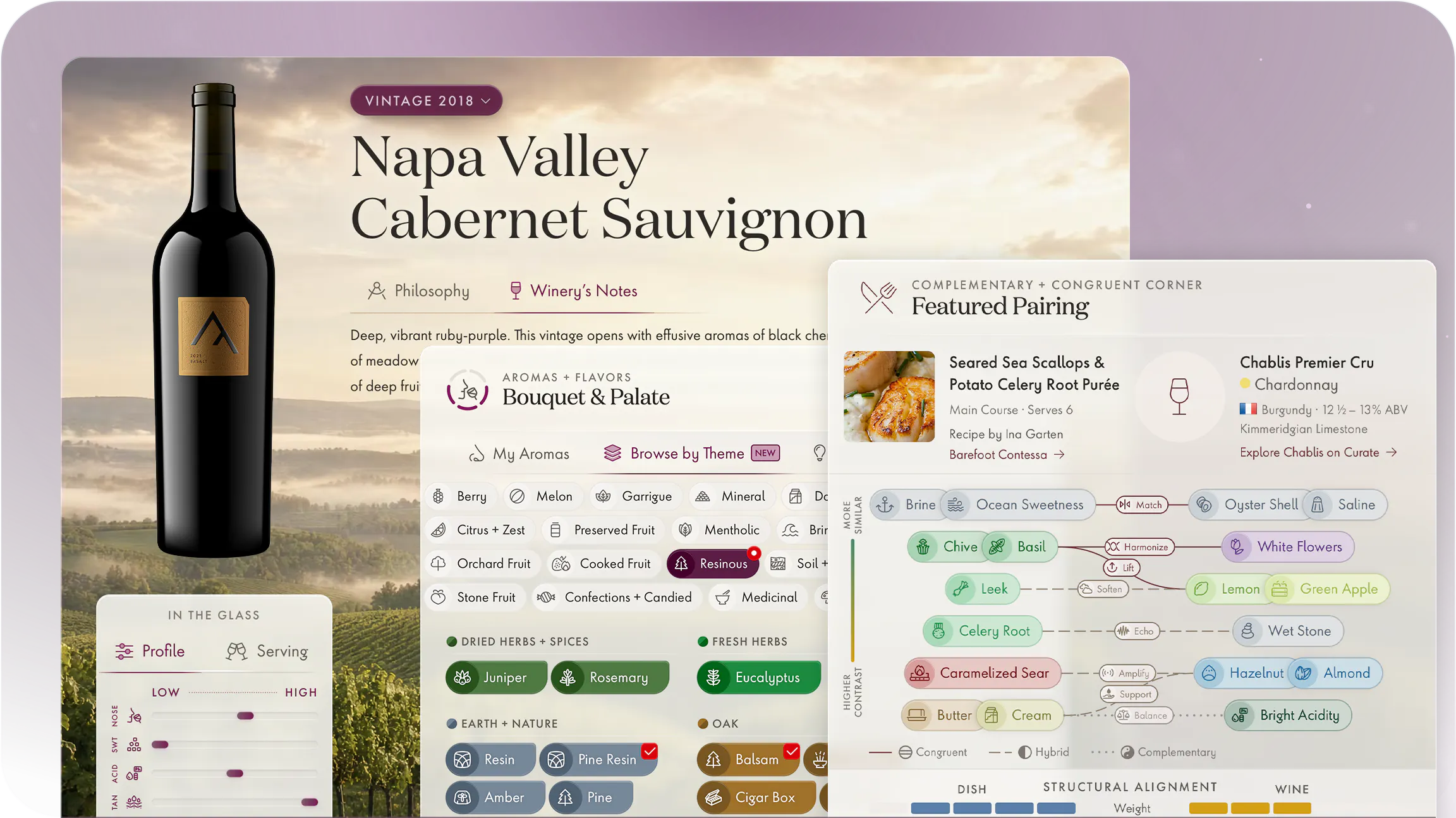
The refreshed Curate interface: warm sandstone surfaces and a refined type system for wine names and structured tasting detail

A New Design Language for Curate

  • App-Wide
  • UI/UX

Curate has a new look: The app’s interface now features a color palette of warm sandstone with mulberry accents and layered glass surfaces that evoke a subtle sense of depth. Titles now wear a display serif drawn from historic wine-house lettering and cellar typography, which sits alongside the precise geometric sans the app is built on. It’s a visual register that balances an atmosphere of old-world heritage with modern functionality.

Smarter Aroma Selections

  • UI/UX
  • Tasting Note Builder
  • Bouquet & Palate

Curate includes two new ways to add what you smell and taste:

Browse by Theme: Browse aromas by sensory families and shared characteristics that cut across categories, like Resinous, Stone Fruit, and Oxidative.

Style Shortlist:Beta Review a concise list of common aromas for the particular wine style/varietal you’re drinking.

Mix and Match: You can freely switch between Curate’s four methods for adding aromas (the above two plus Keyword Search and Aroma Wheel) as you build tasting notes.

Privacy & Product Polish

  • Privacy
  • Maintenance

We’ve rolled out several privacy-related changes:

Tasting Note Visibility: Each tasting now carries its own visibility setting, making it possible to share individual notes while keeping others private.

Third-Party Dependencies: We’ve updated several elements that relied on services provided by Google with more privacy-conscious alternatives.

UI Polish: We’ve worked through a long list of small refinements to spacing, validation, loading, and device compatibility across the app.

Policy Updates: We published an update to Curate’s Terms of Service and Privacy Policy:
  • Added clearer language for note visibility, third-party service providers, security and anti-abuse checks, data retention, regional privacy rights, and our commitment not to sell personal information or share it for cross-context behavioral advertising.
  • Clarified terms for subscription-specific features, voice-related functionality, fair-use limits, and resources provided via our website.

Tasting Library, Rebuilt

  • UI/UX
  • Library View
  • Tasting Notes

The tasting library view has been rebuilt for exploring your notes more easily:

Filter: Select any element within a row to show contextual filtering options for finding notes with similar attributes.

Sort: Browse chronologically, alphabetically, by number of aromas, and more.

Search: Your notes are never more than a few keystrokes away.
  • Enter wine keywords (brand, grape/style, region, vintage) to narrow by what was being tasted.
  • Enter tasting keywords (aromas, characteristics, location, people, stemware, etc.) to narrow by what was entered in your note.
  • Search is unified: A single box works with all fields and it’s typo-tolerant to find entries even with mild misspellings.

Improved Dictation and Transcription

  • Curate for Sommeliers
  • Tasting Note Builder
  • Voice Features

For Curate for Sommeliers subscribers on the CMS Advanced / Master plan, voice-enabled tastings are sharper:

Wine-Tuned Accuracy: A new transcription model with more extensive wine vocabulary captures spoken blind tasting observations more faithfully.

Synced Playback: The finished note plays your recording back on a timeline. Select any line to jump to that moment, or follow along as it scrolls.

Aroma Wheel, Refined

  • UI/UX
  • Tasting Note Builder
  • Bouquet & Palate

The Aroma Wheel has been revised:

Tidied Categories: We revisited which aromas are included in each category to balance the number of options presented while prioritizing those which are common/classic.

Iconography & Typography: Text inside the wheel now follows the shape of the arc around it, and every option features its corresponding icon.

Navigation Options: Control whether the wheel drills down to the most specific options and whether it resets when an aroma is added.

Smaller Screen Fixes: Wheel behavior has been refined to improve positioning and usability on mobile devices.

Tasting Note Viewer, Rebuilt

  • UI/UX
  • Tasting Notes

Open a finished note and it now fills the screen, organized the way you tasted:

Context Up Top: The author and wine’s identity stay pinned at the top while new structured cards lay out environment, appearance, aromas and flavors, rating, and written notes.

Consolidated Profile Levels & Characteristics: Selected characteristics now appear in a dedicated lane alongside their respective level indicators (e.g., Silky appears alongside Tannin).

Note Metadata: See which detail level or sommelier format the note was built with, as well as when the note was created/updated (distinct from the date of tasting).

Tasting Note Builder, Redesigned

  • UI/UX
  • Tasting Note Builder
  • Curate for Sommeliers

The tasting note builder has been rebuilt from the ground up with a visual overhaul and several new fields. The new experience is incorporated into both everyday tastings and blind tasting practice exam formats in Curate for Sommeliers:

New Layout: Sections and their essential fields now live in a grid system reminiscent of a bento box (single-column on small screens).

Editor Panel: All fields for every section can be accessed by way of a new editor panel that slides in whenever you want to go deeper.

Quick Selections: Simply tap/click any field you see to choose from frequently-used options or open the editor panel to its section.

Occasions: Record why you opened a bottle so your tasting documents the occasion, with options ranging from vacations and date nights to soirées and blind tasting flights. Name your occasion to group wines you tasted at an event.

Environment Accuracy: New fields optionally capture the accuracy of “amount tasted” and the measurement source of temperature to support entering estimates. Greater specificity also comes to the decanting fields.

Meaningful Conclusions: New “would buy again” and “would recommend” fields capture the essence of how much you liked a wine beyond scores and sensory options.

Wine Dossiers, Rebuilt

  • UI/UX
  • Vintage View

Every wine and vintage now presents as a dossier:

Structure Overview: A profile block lays out structural elements (aromatic intensity, acidity, body, tannin, oak, sweetness, and alcohol) combining the wine’s style baseline with technical data from its vintage definition.

Serving Guidance: A style-specific serving temperature and an age-adjusted decanting suggestion sit alongside, ready at a glance.

Note Listing: Attached tasting notes for the wine now appear in a detail-dense summary to show highlights without opening the full-screen note viewer.

Wine Styles & Descriptors Updated

  • Data
  • Tasting Note Builder
  • Wine Definitions

Datasets that underpin several foundational features in Curate were updated:

Wine Styles & Varietals: We restructured the system to support nesting (e.g., Burgundy is now separately selectable as a regional subtype of Pinot Noir), built a new searchable selector, and expanded the list to include a few missing obscure varietals.

Aromas & Characteristics: The categories/groupings of existing options were refined, plus several new options were introduced.

Enhanced Synonyms: Styles/Varietals, Aromas/Flavors, and Profile Characteristics were updated with additional keywords for search.

Food & Wine Pairing Widget

  • UI/UX
  • Home View

The app’s home view has new content:

Pairings, Explained: A new visualization pairs a dish with a wine and shows why it works. Explore the interconnected flavors that bridge, lift, and balance one another.

Regions, Side by Side: Unearth the nuance of terroir with a comparison of how soil types shape what ends up in the glass.

Vintage Capsule: Follow the twists and turns of how weather patterns impact a finished wine at release and its cellaring outlook.

Blind Tasting Mistake Map

  • Interactive Resource
  • Blind Tasting

For sommelier candidates, the Blind Tasting Mistake Map is a guide to easily misidentified aromas and the wines they classically appear in.

Aroma Groups: Each row corresponds to one or more aromas that appear together, with distinguishing characteristics for each.

Varietals/Styles: Exam-relevant wines often exhibiting the aroma(s) are listed, with key facts for each.

Study Snapshots: Every varietal/style shown includes how it presents in the glass, qualitative elements, contrasting differentiators, exam considerations, profile levels, climate, soil types, and vinification techniques.

Common Mistakes: Check 3–5 easy-to-make mistakes per aroma group with tips on how to differentiate between similar wines.

Extra Details: For each aroma group, see the ideal bottle age for blind tasting practice, relative intensity, and mnemonics to commit the association to memory.

Curate for Sommeliers Launches

  • Curate for Sommeliers
  • Blind Tasting

Curate for Sommeliers is a new subscription service designed for CMS and WSET exam candidates, providing a framework for improving accuracy and speed in blind wine tasting:

Blind Tasting Notes: Build tasting notes in exam-aligned formats with additional features that cater to exam preparedness.

Study Reports: Analytics reveal patterns in conclusion accuracy, coverage of exam-relevant regions/styles, and pacing, helpful in choosing an optimal set of wines to include in practice.